

# 一.HMR
创建文件
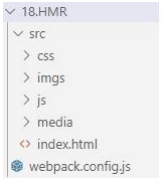
修改配置文件
const { resolve } = require('path');
const HtmlWebpackPlugin = require('html-webpack-plugin');
module.exports = {
    entry: ['./src/js/index.js', './src/index.html'],
    output: {
        filename: 'js/built.js',
        path: resolve(** dirname, 'build')
    },
    module: {
        rules: [
            // loader 的配置
            {
                // 处理 less 资源
                test: /\.less$/,
                use: ['style-loader', 'css-loader', 'less-loader']
            },
            {
                // 处理 css 资源
                test: /\.css$/,
                use: ['style-loader', 'css-loader']
            },
            {
                // 处理图片资源
                test: /\.(jpg|png|gif)$/,
                loader: 'url-loader',
                options: {
                    limit: 8 * 1024,
                    name: '[hash:10].[ext]',
                    // 关闭 es6 模块化
                    esModule: false,
                    outputPath: 'imgs'
                }
            },
            {
                // 处理 html 中 img 资源
                test: /\.html$/,
                loader: 'html-loader'
            },
            {
                // 处理其他资源
                exclude: /\.(html|js|css|less|jpg|png|gif)/,
                loader: 'file-loader',
                options: {
                    name: '[hash:10].[ext]',
                    outputPath: 'media'
                }
            }
        ]
    },
    plugins: [
        // plugins 的配置
        new HtmlWebpackPlugin({
            template: './src/index.html'
        })
    ],
    mode: 'development',
    devServer: {
        contentBase: resolve(** dirname, 'build'),
        compress: true,
        port: 3000,
        open: true,
        // 开启 HMR 功能
        // 当修改了 webpack 配置,新配置要想生效,必须重新 webpack 服务
        hot: true
    }
};
1
2
3
4
5
6
7
8
9
10
11
12
13
14
15
16
17
18
19
20
21
22
23
24
25
26
27
28
29
30
31
32
33
34
35
36
37
38
39
40
41
42
43
44
45
46
47
48
49
50
51
52
53
54
55
56
57
58
59
60
61
62
63
64
65
66
67
2
3
4
5
6
7
8
9
10
11
12
13
14
15
16
17
18
19
20
21
22
23
24
25
26
27
28
29
30
31
32
33
34
35
36
37
38
39
40
41
42
43
44
45
46
47
48
49
50
51
52
53
54
55
56
57
58
59
60
61
62
63
64
65
66
67
- 运行指令: webpack
# 二.source-map
创建文件
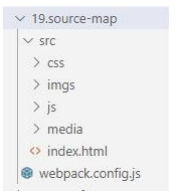
修改配置文件
const { resolve } = require('path');
const HtmlWebpackPlugin = require('html-webpack-plugin');
module.exports = {
    entry: ['./src/js/index.js', './src/index.html'],
    output: {
        filename: 'js/built.js',
        path: resolve(** dirname, 'build')
    },
    module: {
        rules: [
            // loader 的配置
            {
                // 处理 less 资源
                test: /\.less$/,
                use: ['style-loader', 'css-loader', 'less-loader']
            },
            {
                // 处理 css 资源
                test: /\.css$/,
                use: ['style-loader', 'css-loader']
            },
            {
                // 处理图片资源
                test: /\.(jpg|png|gif)$/,
                loader: 'url-loader',
                options: {
                    limit: 8 * 1024,
                    name: '[hash:10].[ext]',
                    // 关闭 es6 模块化
                    esModule: false,
                    outputPath: 'imgs'
                }
            },
            {
                // 处理 html 中 img 资源
                test: /\.html$/,
                loader: 'html-loader'
            },
            {
                // 处理其他资源
                exclude: /\.(html|js|css|less|jpg|png|gif)/,
                loader: 'file-loader',
                options: {
                    name: '[hash:10].[ext]',
                    outputPath: 'media'
                }
            }
        ]
    },
    plugins: [
        // plugins 的配置
        new HtmlWebpackPlugin({
            template: './src/index.html'
        })
    ],
    mode: 'development',
    devServer: {
        contentBase: resolve(** dirname, 'build'),
        compress: true,
        port: 3000,
        open: true,
        hot: true
    },
    devtool: 'eval-source-map'
};
1
2
3
4
5
6
7
8
9
10
11
12
13
14
15
16
17
18
19
20
21
22
23
24
25
26
27
28
29
30
31
32
33
34
35
36
37
38
39
40
41
42
43
44
45
46
47
48
49
50
51
52
53
54
55
56
57
58
59
60
61
62
63
64
65
2
3
4
5
6
7
8
9
10
11
12
13
14
15
16
17
18
19
20
21
22
23
24
25
26
27
28
29
30
31
32
33
34
35
36
37
38
39
40
41
42
43
44
45
46
47
48
49
50
51
52
53
54
55
56
57
58
59
60
61
62
63
64
65
- 运行指令: webpack
# 三.oneOf
创建文件

修改配置文件
const { resolve } = require('path');
const MiniCssExtractPlugin = require('mini-css-extract-plugin');
const OptimizeCssAssetsWebpackPlugin = require('optimize-css-assets-webpack-plugin'
);
const HtmlWebpackPlugin = require('html-webpack-plugin');
// 定义 nodejs 环境变量:决定使用 browserslist 的哪个环境
process.env.NODE_ENV = 'production';
// 复用 loader
const commonCssLoader = [
    MiniCssExtractPlugin.loader,
    'css-loader',
    {
        // 还需要在 package.json 中定义 browserslist
        loader: 'postcss-loader',
        options: {
            ident: 'postcss',
            plugins: () => [require('postcss-preset-env')()]
        }
    }
];
module.exports = {
    entry: './src/js/index.js',
    output: {
        filename: 'js/built.js',
        path: resolve(\_\_dirname, 'build')
    },
    module: {
        rules: [
            {
                // 在 package.json 中 eslintConfig --> airbnb
                test: /\.js$/,
                exclude: /node_modules/,
                // 优先执行
                enforce: 'pre',
                loader: 'eslint-loader',
                options: {
                    fix: true
                }
            },
            {
                // 以下 loader 只会匹配一个
                // 注意:不能有两个配置处理同一种类型文件
                oneOf: [
                    {
                        test: /\.css$/,
                        use: [...commonCssLoader]
                    },
                    {
                        test: /\.less$/,
                        use: [...commonCssLoader, 'less-loader']
                    },
                    /*正常来讲,一个文件只能被一个 loader 处理。
                    当一个文件要被多个 loader 处理,那么一定要指定 loader 执行的先后顺序:
                    先执行 eslint 在执行 babel
                    */
                    {
                        test: /\.js$/,
                        exclude: /node_modules/,
                        loader: 'babel-loader',
                        options: {
                            presets: [
                                [
                                    '@babel/preset-env',
                                    {
                                        useBuiltIns: 'usage',
                                        corejs: { version: 3 },
                                        targets: {
                                            chrome: '60',
                                            firefox: '50'
                                        }
                                    }
                                ]
                            ]
                        }
                    },
                    {
                        test: /\.(jpg|png|gif)/,
                        loader: 'url-loader',
                        options: {
                            limit: 8 \* 1024,
                            name: '[hash:10].[ext]',
                            outputPath: 'imgs',
                            esModule: false
                        }
                    },
                    {
                        test: /\.html\$/,
                        loader: 'html-loader'
                    },
                    {
                        exclude: /\.(js|css|less|html|jpg|png|gif)/,
                        loader: 'file-loader',
                        options: {
                            outputPath: 'media'
                        }
                    }
                ]
            }
        ]
    },
    plugins: [
        new MiniCssExtractPlugin({
            filename: 'css/built.css'
        }),
        new OptimizeCssAssetsWebpackPlugin(),
        new HtmlWebpackPlugin({
            template: './src/index.html',
            minify: {
                collapseWhitespace: true,
                removeComments: true
            }
        })
    ],
    mode: 'production'
};
1
2
3
4
5
6
7
8
9
10
11
12
13
14
15
16
17
18
19
20
21
22
23
24
25
26
27
28
29
30
31
32
33
34
35
36
37
38
39
40
41
42
43
44
45
46
47
48
49
50
51
52
53
54
55
56
57
58
59
60
61
62
63
64
65
66
67
68
69
70
71
72
73
74
75
76
77
78
79
80
81
82
83
84
85
86
87
88
89
90
91
92
93
94
95
96
97
98
99
100
101
102
103
104
105
106
107
108
109
110
111
112
113
114
115
2
3
4
5
6
7
8
9
10
11
12
13
14
15
16
17
18
19
20
21
22
23
24
25
26
27
28
29
30
31
32
33
34
35
36
37
38
39
40
41
42
43
44
45
46
47
48
49
50
51
52
53
54
55
56
57
58
59
60
61
62
63
64
65
66
67
68
69
70
71
72
73
74
75
76
77
78
79
80
81
82
83
84
85
86
87
88
89
90
91
92
93
94
95
96
97
98
99
100
101
102
103
104
105
106
107
108
109
110
111
112
113
114
115
- 运行指令:webpack
# 四.缓存
- 创建文件
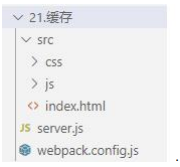
- 修改配置文件
const { resolve } = require('path');
const MiniCssExtractPlugin = require('mini-css-extract-plugin');
const OptimizeCssAssetsWebpackPlugin = require('optimize-css-assets-webpack-plugin'
);
const HtmlWebpackPlugin = require('html-webpack-plugin');
// 定义 nodejs 环境变量:决定使用 browserslist 的哪个环境
process.env.NODE_ENV = 'production';
// 复用 loader
const commonCssLoader = [
    MiniCssExtractPlugin.loader,
    'css-loader',
    {
        // 还需要在 package.json 中定义 browserslist
        loader: 'postcss-loader',
        options: {
            ident: 'postcss',
            plugins: () => [require('postcss-preset-env')()]
        }
    }
];
module.exports = {
    entry: './src/js/index.js',
    output: {
        filename: 'js/built.[contenthash:10].js',
        path: resolve(\_\_dirname, 'build')
    },
    module: {
        rules: [
            {
                // 在 package.json 中 eslintConfig --> airbnb
                test: /\.js$/,
                exclude: /node_modules/,
                // 优先执行
                enforce: 'pre',
                loader: 'eslint-loader',
                options: {
                    fix: true
                }
            },
            {
                // 以下 loader 只会匹配一个
                // 注意:不能有两个配置处理同一种类型文件
                oneOf: [
                    {
                        test: /\.css$/,
                        use: [...commonCssLoader]
                    },
                    {
                        test: /\.less$/,
                        use: [...commonCssLoader, 'less-loader']
                    },
                    /*正常来讲,一个文件只能被一个 loader 处理。
                    当一个文件要被多个 loader 处理,那么一定要指定 loader 执行的先后顺序:
                    先执行 eslint 在执行 babel
                    */
                    {
                        test: /\.js$/,
                        exclude: /node_modules/,
                        loader: 'babel-loader',
                        options: {
                            presets: [
                                [
                                    '@babel/preset-env',
                                    {
                                        useBuiltIns: 'usage',
                                        corejs: { version: 3 },
                                        targets: {
                                            chrome: '60',
                                            firefox: '50'
                                        }
                                    }
                                ]
                            ],
                            // 开启 babel 缓存
                            // 第二次构建时,会读取之前的缓存
                            cacheDirectory: true
                        }
                    },
                    {
                        test: /\.(jpg|png|gif)/,
                        loader: 'url-loader',
                        options: {
                            limit: 8 \* 1024,
                            name: '[hash:10].[ext]',
                            outputPath: 'imgs',
                            esModule: false
                        }
                    },
                    {
                        test: /\.html\$/,
                        loader: 'html-loader'
                    },
                    {
                        exclude: /\.(js|css|less|html|jpg|png|gif)/,
                        loader: 'file-loader',
                        options: {
                            outputPath: 'media'
                        }
                    }
                ]
            }
        ]
    },
    plugins: [
        new MiniCssExtractPlugin({
            filename: 'css/built.[contenthash:10].css'
        }),
        new OptimizeCssAssetsWebpackPlugin(),
        new HtmlWebpackPlugin({
            template: './src/index.html',
            minify: {
                collapseWhitespace: true,
                removeComments: true
            }
        })
    ],
    mode: 'production',
    devtool: 'source-map'
};
1
2
3
4
5
6
7
8
9
10
11
12
13
14
15
16
17
18
19
20
21
22
23
24
25
26
27
28
29
30
31
32
33
34
35
36
37
38
39
40
41
42
43
44
45
46
47
48
49
50
51
52
53
54
55
56
57
58
59
60
61
62
63
64
65
66
67
68
69
70
71
72
73
74
75
76
77
78
79
80
81
82
83
84
85
86
87
88
89
90
91
92
93
94
95
96
97
98
99
100
101
102
103
104
105
106
107
108
109
110
111
112
113
114
115
116
117
118
119
2
3
4
5
6
7
8
9
10
11
12
13
14
15
16
17
18
19
20
21
22
23
24
25
26
27
28
29
30
31
32
33
34
35
36
37
38
39
40
41
42
43
44
45
46
47
48
49
50
51
52
53
54
55
56
57
58
59
60
61
62
63
64
65
66
67
68
69
70
71
72
73
74
75
76
77
78
79
80
81
82
83
84
85
86
87
88
89
90
91
92
93
94
95
96
97
98
99
100
101
102
103
104
105
106
107
108
109
110
111
112
113
114
115
116
117
118
119
- 运行指令: webpack
# 五.tree shaking
创建文件
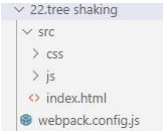
修改配置文件
   const { resolve } = require('path');
const MiniCssExtractPlugin = require('mini-css-extract-plugin');
const OptimizeCssAssetsWebpackPlugin = require('optimize-css-assets-webpack-plugin'
);
const HtmlWebpackPlugin = require('html-webpack-plugin');
// 定义 nodejs 环境变量:决定使用 browserslist 的哪个环境
process.env.NODE_ENV = 'production';
// 复用 loader
const commonCssLoader = [
    MiniCssExtractPlugin.loader,
    'css-loader',
    {
        // 还需要在 package.json 中定义 browserslist
        loader: 'postcss-loader',
        options: {
            ident: 'postcss',
            plugins: () => [require('postcss-preset-env')()]
        }
    }
];
module.exports = {
    entry: './src/js/index.js',
    output: {
        filename: 'js/built.[contenthash:10].js',
        path: resolve(\_\_dirname, 'build')
    },
    module: {
        rules: [
            {
                // 在 package.json 中 eslintConfig --> airbnb
                test: /\.js$/,
                exclude: /node_modules/,
                // 优先执行
                enforce: 'pre',
                loader: 'eslint-loader',
                options: {
                    fix: true
                }
            },
            {
                // 以下 loader 只会匹配一个
                // 注意:不能有两个配置处理同一种类型文件
                oneOf: [
                    {
                        test: /\.css$/,
                        use: [...commonCssLoader]
                    },
                    {
                        test: /\.less$/,
                        use: [...commonCssLoader, 'less-loader']
                    },
                    /*正常来讲,一个文件只能被一个 loader 处理。
                    前端课程系列
                    ———————————————————————————
                    39
                    更多 Java –大数据 –前端 –python 人工智能资料下载,可访问百度:尚硅谷官网
                    当一个文件要被多个 loader 处理,那么一定要指定 loader 执行的先后顺序:
                    先执行 eslint 在执行 babel
                    */
                    {
                        test: /\.js$/,
                        exclude: /node_modules/,
                        loader: 'babel-loader',
                        options: {
                            presets: [
                                [
                                    '@babel/preset-env',
                                    {
                                        useBuiltIns: 'usage',
                                        corejs: { version: 3 },
                                        targets: {
                                            chrome: '60',
                                            firefox: '50'
                                        }
                                    }
                                ]
                            ],
                            // 开启 babel 缓存
                            // 第二次构建时,会读取之前的缓存
                            cacheDirectory: true
                        }
                    },
                    {
                        test: /\.(jpg|png|gif)/,
                        loader: 'url-loader',
                        options: {
                            limit: 8 \* 1024,
                            name: '[hash:10].[ext]',
                            outputPath: 'imgs',
                            esModule: false
                        }
                    },
                    {
                        test: /\.html\$/,
                        loader: 'html-loader'
                    },
                    {
                        exclude: /\.(js|css|less|html|jpg|png|gif)/,
                        loader: 'file-loader',
                        options: {
                            outputPath: 'media'
                        }
                    }
                ]
            }
        ]
    },
    plugins: [
        new MiniCssExtractPlugin({
            filename: 'css/built.[contenthash:10].css'
        }),
        new OptimizeCssAssetsWebpackPlugin(),
        new HtmlWebpackPlugin({
            template: './src/index.html',
            minify: {
                collapseWhitespace: true,
                removeComments: true
            }
        })
    ],
    mode: 'production',
    devtool: 'source-map'
};
1
2
3
4
5
6
7
8
9
10
11
12
13
14
15
16
17
18
19
20
21
22
23
24
25
26
27
28
29
30
31
32
33
34
35
36
37
38
39
40
41
42
43
44
45
46
47
48
49
50
51
52
53
54
55
56
57
58
59
60
61
62
63
64
65
66
67
68
69
70
71
72
73
74
75
76
77
78
79
80
81
82
83
84
85
86
87
88
89
90
91
92
93
94
95
96
97
98
99
100
101
102
103
104
105
106
107
108
109
110
111
112
113
114
115
116
117
118
119
120
121
122
123
2
3
4
5
6
7
8
9
10
11
12
13
14
15
16
17
18
19
20
21
22
23
24
25
26
27
28
29
30
31
32
33
34
35
36
37
38
39
40
41
42
43
44
45
46
47
48
49
50
51
52
53
54
55
56
57
58
59
60
61
62
63
64
65
66
67
68
69
70
71
72
73
74
75
76
77
78
79
80
81
82
83
84
85
86
87
88
89
90
91
92
93
94
95
96
97
98
99
100
101
102
103
104
105
106
107
108
109
110
111
112
113
114
115
116
117
118
119
120
121
122
123
- 运行指令:
webpack
# 六.code split
创建文件
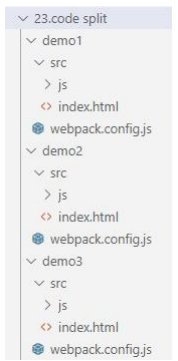
修改 demo1 配置文件
const { resolve } = require('path');
const HtmlWebpackPlugin = require('html-webpack-plugin');
module.exports = {
    // 单入口
    // entry: './src/js/index.js',
    entry: {
        // 多入口:有一个入口,最终输出就有一个 bundle
        index: './src/js/index.js',
        test: './src/js/test.js'
    },
    output: {
        // [name]:取文件名
        filename: 'js/[name].[contenthash:10].js',
        path: resolve(** dirname, 'build')
    },
    plugins: [
        new HtmlWebpackPlugin({
            template: './src/index.html',
            minify: {
                collapseWhitespace: true,
                removeComments: true
            }
        })
    ],
    mode: 'production'
};
1
2
3
4
5
6
7
8
9
10
11
12
13
14
15
16
17
18
19
20
21
22
23
24
25
26
2
3
4
5
6
7
8
9
10
11
12
13
14
15
16
17
18
19
20
21
22
23
24
25
26
- 修改 demo2 配置文件
const { resolve } = require('path');
const HtmlWebpackPlugin = require('html-webpack-plugin');
module.exports = {
    // 单入口
    // entry: './src/js/index.js',
    entry: {
        index: './src/js/index.js',
        test: './src/js/test.js'
    },
    output: {
        // [name]:取文件名
        filename: 'js/[name].[contenthash:10].js',
        path: resolve(** dirname, 'build')
    },
    plugins: [
        new HtmlWebpackPlugin({
            template: './src/index.html',
            minify: {
                collapseWhitespace: true,
                removeComments: true
            }
        })
    ],

    // 1. 可以将 node_modules 中代码单独打包一个 chunk 最终输出
    // 2. 自动分析多入口 chunk 中,有没有公共的文件。如果有会打包成单独一个 chunk

    optimization: {
        splitChunks: {
            chunks: 'all'
        }
    },
    mode: 'production'
};
1
2
3
4
5
6
7
8
9
10
11
12
13
14
15
16
17
18
19
20
21
22
23
24
25
26
27
28
29
30
31
32
33
34
2
3
4
5
6
7
8
9
10
11
12
13
14
15
16
17
18
19
20
21
22
23
24
25
26
27
28
29
30
31
32
33
34
- 修改 demo3 配置文件
const { resolve } = require("path");
const HtmlWebpackPlugin = require("html-webpack-plugin");
module.exports = {
  // 单入口
  entry: "./src/js/index.js",
  output: {
    // [name]:取文件名
    filename: "js/[name].[contenthash:10].js",
    path: resolve(dirname, "build"),
  },
  plugins: [
    new HtmlWebpackPlugin({
      template: "./src/index.html",
      minify: {
        collapseWhitespace: true,
        removeComments: true,
      },
    }),
  ],

  // 1. 可以将 node_modules 中代码单独打包一个 chunk 最终输出
  // 2. 自动分析多入口 chunk 中,有没有公共的文件。如果有会打包成单独一个 chunk
  optimization: {
    splitChunks: {
      chunks: "all",
    },
  },
  mode: "production",
};
1
2
3
4
5
6
7
8
9
10
11
12
13
14
15
16
17
18
19
20
21
22
23
24
25
26
27
28
29
2
3
4
5
6
7
8
9
10
11
12
13
14
15
16
17
18
19
20
21
22
23
24
25
26
27
28
29
- 运行指令:
webpack
# 七.lazy loading
- 创建文件
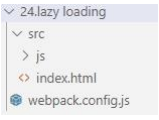
- 修改配置文件
const { resolve } = require("path");
const HtmlWebpackPlugin = require("html-webpack-plugin");
module.exports = {
  // 单入口
  entry: "./src/js/index.js",
  output: {
    filename: "js/[name].[contenthash:10].js",
    path: resolve(dirname, "build"),
  },
  plugins: [
    new HtmlWebpackPlugin({
      template: "./src/index.html",
      minify: {
        collapseWhitespace: true,
        removeComments: true,
      },
    }),
  ],
  optimization: {
    splitChunks: {
      chunks: "all",
    },
  },
  mode: "production",
};
1
2
3
4
5
6
7
8
9
10
11
12
13
14
15
16
17
18
19
20
21
22
23
24
25
2
3
4
5
6
7
8
9
10
11
12
13
14
15
16
17
18
19
20
21
22
23
24
25
- 运行指令:
webpack
# 八.pwa
- 创建文件
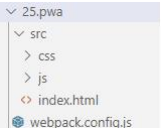
下载安装包
npm install --save-dev workbox-webpack-plugin
修改配置文件
  const { resolve } = require('path');
const MiniCssExtractPlugin = require('mini-css-extract-plugin');
const OptimizeCssAssetsWebpackPlugin = require('optimize-css-assets-webpack-plugin'
);
const HtmlWebpackPlugin = require('html-webpack-plugin');
const WorkboxWebpackPlugin = require('workbox-webpack-plugin');
/*
PWA: 渐进式网络开发应用程序(离线可访问)
workbox --> workbox-webpack-plugin
*/
// 定义 nodejs 环境变量:决定使用 browserslist 的哪个环境
process.env.NODE_ENV = 'production';
// 复用 loader
const commonCssLoader = [
    MiniCssExtractPlugin.loader,
    'css-loader',
    {
        // 还需要在 package.json 中定义 browserslist
        loader: 'postcss-loader',
        options: {
            ident: 'postcss',
            plugins: () => [require('postcss-preset-env')()]

        }
    }
];
module.exports = {
    entry: './src/js/index.js',
    output: {
        filename: 'js/built.[contenthash:10].js',
        path: resolve(\_\_dirname, 'build')
    },
    module: {
        rules: [
            {
                // 在 package.json 中 eslintConfig --> airbnb
                test: /\.js$/,
                exclude: /node_modules/,
                // 优先执行
                enforce: 'pre',
                loader: 'eslint-loader',
                options: {
                    fix: true
                }
            },
            {
                // 以下 loader 只会匹配一个
                // 注意:不能有两个配置处理同一种类型文件
                oneOf: [
                    {
                        test: /\.css$/,
                        use: [...commonCssLoader]
                    },
                    {
                        test: /\.less$/,
                        use: [...commonCssLoader, 'less-loader']
                    },
                    /*正常来讲,一个文件只能被一个 loader 处理。
                    当一个文件要被多个 loader 处理,那么一定要指定 loader 执行的先后顺序:
                    先执行 eslint 在执行 babel
                    */
                    {
                        test: /\.js$/,

                        exclude: /node_modules/,
                        loader: 'babel-loader',
                        options: {
                            presets: [
                                [
                                    '@babel/preset-env',
                                    {
                                        useBuiltIns: 'usage',
                                        corejs: { version: 3 },
                                        targets: {
                                            chrome: '60',
                                            firefox: '50'
                                        }
                                    }
                                ]
                            ],
                            // 开启 babel 缓存
                            // 第二次构建时,会读取之前的缓存
                            cacheDirectory: true
                        }
                    },
                    {
                        test: /\.(jpg|png|gif)/,
                        loader: 'url-loader',
                        options: {
                            limit: 8 _ 1024,
                            name: '[hash:10].[ext]',
                            outputPath: 'imgs',
                            esModule: false
                        }
                    },
                    {
                        test: /\.html\$/,
                        loader: 'html-loader'
                    },
                    {
                        exclude: /\.(js|css|less|html|jpg|png|gif)/,
                        loader: 'file-loader',
                        options: {
                            outputPath: 'media'
                        }
                    }

                ]
            }
        ]
    },
    plugins: [
        new MiniCssExtractPlugin({
            filename: 'css/built.[contenthash:10].css'
        }),
        new OptimizeCssAssetsWebpackPlugin(),
        new HtmlWebpackPlugin({
            template: './src/index.html',
            minify: {
                collapseWhitespace: true,
                removeComments: true
            }
        }),
        new WorkboxWebpackPlugin.GenerateSW({
            /*
            1. 帮助 serviceworker 快速启动
            2. 删除旧的 serviceworker
            3.生成一个 serviceworker 配置文件
            */
            clientsClaim: true,
            skipWaiting: true
        })
    ],
    mode: 'production',
    devtool: 'source-map'
};
1
2
3
4
5
6
7
8
9
10
11
12
13
14
15
16
17
18
19
20
21
22
23
24
25
26
27
28
29
30
31
32
33
34
35
36
37
38
39
40
41
42
43
44
45
46
47
48
49
50
51
52
53
54
55
56
57
58
59
60
61
62
63
64
65
66
67
68
69
70
71
72
73
74
75
76
77
78
79
80
81
82
83
84
85
86
87
88
89
90
91
92
93
94
95
96
97
98
99
100
101
102
103
104
105
106
107
108
109
110
111
112
113
114
115
116
117
118
119
120
121
122
123
124
125
126
127
128
129
130
131
132
133
134
135
136
2
3
4
5
6
7
8
9
10
11
12
13
14
15
16
17
18
19
20
21
22
23
24
25
26
27
28
29
30
31
32
33
34
35
36
37
38
39
40
41
42
43
44
45
46
47
48
49
50
51
52
53
54
55
56
57
58
59
60
61
62
63
64
65
66
67
68
69
70
71
72
73
74
75
76
77
78
79
80
81
82
83
84
85
86
87
88
89
90
91
92
93
94
95
96
97
98
99
100
101
102
103
104
105
106
107
108
109
110
111
112
113
114
115
116
117
118
119
120
121
122
123
124
125
126
127
128
129
130
131
132
133
134
135
136
- 运行指令:
webpack
# 九.多进程打包
- 创建文件
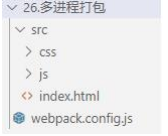
- 下载安装包
npm install --save-dev thread-loader
- 修改配置文件
const { resolve } = require('path');
const MiniCssExtractPlugin = require('mini-css-extract-plugin');
const OptimizeCssAssetsWebpackPlugin = require('optimize-css-assets-webpack-plugin'
);
const HtmlWebpackPlugin = require('html-webpack-plugin');
const WorkboxWebpackPlugin = require('workbox-webpack-plugin');
/*
PWA: 渐进式网络开发应用程序(离线可访问)
workbox --> workbox-webpack-plugin
*/
// 定义 nodejs 环境变量:决定使用 browserslist 的哪个环境
process.env.NODE_ENV = 'production';
// 复用 loader
const commonCssLoader = [
    MiniCssExtractPlugin.loader,
    'css-loader',
    {
        // 还需要在 package.json 中定义 browserslist
        loader: 'postcss-loader',
        options: {
            ident: 'postcss',
            plugins: () => [require('postcss-preset-env')()]
        }
    }
];
module.exports = {
    entry: './src/js/index.js',
    output: {
        filename: 'js/built.[contenthash:10].js',
        path: resolve(\_\_dirname, 'build')
    },
    module: {
        rules: [

            {
                // 在 package.json 中 eslintConfig --> airbnb
                test: /\.js$/,
                exclude: /node_modules/,
                // 优先执行
                enforce: 'pre',
                loader: 'eslint-loader',
                options: {
                    fix: true
                }
            },
            {
                // 以下 loader 只会匹配一个
                // 注意:不能有两个配置处理同一种类型文件
                oneOf: [
                    {
                        test: /\.css$/,
                        use: [...commonCssLoader]
                    },
                    {
                        test: /\.less$/,
                        use: [...commonCssLoader, 'less-loader']
                    },
                    /*正常来讲,一个文件只能被一个 loader 处理。
                    当一个文件要被多个 loader 处理,那么一定要指定 loader 执行的先后顺序:
                    先执行 eslint 在执行 babel
                    */
                    {
                        test: /\.js$/,
                        exclude: /node_modules/,
                        use: [
                            /*开启多进程打包。
                            进程启动大概为 600ms,进程通信也有开销。
                            只有工作消耗时间比较长,才需要多进程打包
                            */
                            {
                                loader: 'thread-loader',
                                options: {
                                    workers: 2 // 进程 2 个
                                }

                            },
                            {
                                loader: 'babel-loader',
                                options: {
                                    presets: [
                                        [
                                            '@babel/preset-env',
                                            {
                                                useBuiltIns: 'usage',
                                                corejs: { version: 3 },
                                                targets: {
                                                    chrome: '60',
                                                    firefox: '50'
                                                }
                                            }
                                        ]
                                    ],
                                    // 开启 babel 缓存
                                    // 第二次构建时,会读取之前的缓存
                                    cacheDirectory: true
                                }
                            }
                        ]
                    },
                    {
                        test: /\.(jpg|png|gif)/,
                        loader: 'url-loader',
                        options: {
                            limit: 8 _ 1024,
                            name: '[hash:10].[ext]',
                            outputPath: 'imgs',
                            esModule: false
                        }
                    },
                    {
                        test: /\.html\$/,
                        loader: 'html-loader'
                    },
                    {
                        exclude: /\.(js|css|less|html|jpg|png|gif)/,
                        loader: 'file-loader',
                        options: {

                            outputPath: 'media'
                        }
                    }
                ]
            }
        ]
    },
    plugins: [
        new MiniCssExtractPlugin({
            filename: 'css/built.[contenthash:10].css'
        }),
        new OptimizeCssAssetsWebpackPlugin(),
        new HtmlWebpackPlugin({
            template: './src/index.html',
            minify: {
                collapseWhitespace: true,
                removeComments: true
            }
        }),
        new WorkboxWebpackPlugin.GenerateSW({
            /*
            1. 帮助 serviceworker 快速启动
            2. 删除旧的 serviceworker
            3. 生成一个 serviceworker 配置文件~
            */
            clientsClaim: true,
            skipWaiting: true
        })
    ],
    mode: 'production',
    devtool: 'source-map'
};
1
2
3
4
5
6
7
8
9
10
11
12
13
14
15
16
17
18
19
20
21
22
23
24
25
26
27
28
29
30
31
32
33
34
35
36
37
38
39
40
41
42
43
44
45
46
47
48
49
50
51
52
53
54
55
56
57
58
59
60
61
62
63
64
65
66
67
68
69
70
71
72
73
74
75
76
77
78
79
80
81
82
83
84
85
86
87
88
89
90
91
92
93
94
95
96
97
98
99
100
101
102
103
104
105
106
107
108
109
110
111
112
113
114
115
116
117
118
119
120
121
122
123
124
125
126
127
128
129
130
131
132
133
134
135
136
137
138
139
140
141
142
143
144
145
146
147
148
149
150
2
3
4
5
6
7
8
9
10
11
12
13
14
15
16
17
18
19
20
21
22
23
24
25
26
27
28
29
30
31
32
33
34
35
36
37
38
39
40
41
42
43
44
45
46
47
48
49
50
51
52
53
54
55
56
57
58
59
60
61
62
63
64
65
66
67
68
69
70
71
72
73
74
75
76
77
78
79
80
81
82
83
84
85
86
87
88
89
90
91
92
93
94
95
96
97
98
99
100
101
102
103
104
105
106
107
108
109
110
111
112
113
114
115
116
117
118
119
120
121
122
123
124
125
126
127
128
129
130
131
132
133
134
135
136
137
138
139
140
141
142
143
144
145
146
147
148
149
150
- 运行指令:webpack
# 十.externals
创建文件
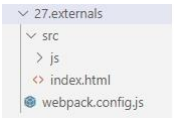
修改配置文件
const { resolve } = require("path");
const HtmlWebpackPlugin = require("html-webpack-plugin");
module.exports = {
  entry: "./src/js/index.js",
  output: {
    filename: "js/built.js",
    path: resolve(dirname, "build"),
  },
  plugins: [
    new HtmlWebpackPlugin({
      template: "./src/index.html",
    }),
  ],
  mode: "production",
  externals: {
    // 拒绝 jQuery 被打包进来
    jquery: "jQuery",
  },
};
1
2
3
4
5
6
7
8
9
10
11
12
13
14
15
16
17
18
19
2
3
4
5
6
7
8
9
10
11
12
13
14
15
16
17
18
19
- 运行指令:
webpack
# 十一.dll
创建文件
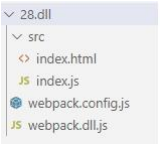
修改配置文件
const { resolve } = require('path');
const HtmlWebpackPlugin = require('html-webpack-plugin');
const webpack = require('webpack');
const AddAssetHtmlWebpackPlugin = require('add-asset-html-webpack-plugin');
module.exports = {
    entry: './src/index.js',
    output: {
        filename: 'built.js',
        path: resolve(** dirname, 'build')
    },
    plugins: [
        new HtmlWebpackPlugin({
            template: './src/index.html'
        }),
        // 告诉 webpack 哪些库不参与打包,同时使用时的名称也得变~
        new webpack.DllReferencePlugin({
            manifest: resolve(** dirname, 'dll/manifest.json')
        }),
        // 将某个文件打包输出去,并在 html 中自动引入该资源
        new AddAssetHtmlWebpackPlugin({
            filepath: resolve(\_\_dirname, 'dll/jquery.js')
        })
    ],
    mode: 'production'
};
1
2
3
4
5
6
7
8
9
10
11
12
13
14
15
16
17
18
19
20
21
22
23
24
25
2
3
4
5
6
7
8
9
10
11
12
13
14
15
16
17
18
19
20
21
22
23
24
25
- 运行指令:
webpack
← 03.生产环境的基本配置 05.配置详情 →