
# 一.基础
dva有一个管理effects执行的hook,并基于此封装了dva-loading插件。通过这个插件,我们可以不必一遍遍地写showLoading和hideLoading,当发起请求时,插件会自动设置数据里的loading状态为true或false。然后我们在渲染components时绑定并根据这个数据进行渲染。
- 每个页面中将 loading 状态作为属性传入组件,在进行样式处理,比如转圈圈或者显示正在加载什么的,但是重点是,我们的 app 有多个页面,每个页面都这么做,很繁琐。如何只做一次状态处理,每次请求期间都会触发 loading 状态呢?dva-loading 提供了一个 global 属性
# 二. 使用
# 1. 基本使用
dva-loading 的使用非常简单,在 index.js 中加入:
//  Plugins
app.use(createLoading());
1
2
2
# 2. state 中的 loading 对象
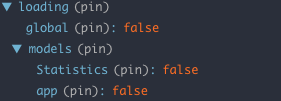
loading 对象中的 global 属性表示的全局 loading 状态,models 里是每个 model 的 loading 状态
所以根据 state.loading.global 指示全局 loading 状态
# 3.例子
import React from 'react';
import styles from './app.css';
import { connect } from 'dva';
import { ActivityIndicator } from 'antd-mobile';

const TIMER = 800;
let timeoutId = null;

class App extends React.Component {
    state = {
        show: false
    }

    componentWillMount() {
        const { loading } = this.props;
        if (loading) {
            timeoutId = setTimeout(() => {
                this.setState({
                    show: true
                });
            }, TIMER);
        }
    }

    componentWillReceiveProps(nextProps) {
        const { loading } = nextProps;
        const { show } = this.state;

        this.setState({
            show: false
        });
        if (loading) {
            timeoutId = setTimeout(() => {
                this.setState({
                    show: true
                });
            }, TIMER);
        }
    }

    componentWillUnmount() {
        if (timeoutId) {
            clearTimeout(timeoutId);
        }
    }

    render() {
        const { loading } = this.props;
        const { show } = this.state;
        return (
            <div className={this.props.className}>
                { this.props.children }
                <div className={styles.loading}>
                    <ActivityIndicator toast text="正在加载" animating={show && loading} />
                </div>
            </div>
        );
    }
}

const mapStateToProps = (state, ownProps) => {
    return {
        loading: state.loading.global && !state.loading.models.Verify
    }
};

export default connect(mapStateToProps)(App);
1
2
3
4
5
6
7
8
9
10
11
12
13
14
15
16
17
18
19
20
21
22
23
24
25
26
27
28
29
30
31
32
33
34
35
36
37
38
39
40
41
42
43
44
45
46
47
48
49
50
51
52
53
54
55
56
57
58
59
60
61
62
63
64
65
66
67
2
3
4
5
6
7
8
9
10
11
12
13
14
15
16
17
18
19
20
21
22
23
24
25
26
27
28
29
30
31
32
33
34
35
36
37
38
39
40
41
42
43
44
45
46
47
48
49
50
51
52
53
54
55
56
57
58
59
60
61
62
63
64
65
66
67
# 参考
[1] https://www.cnblogs.com/zczhangcui/p/7419112.html